AI TOOL / #04118
CEBot
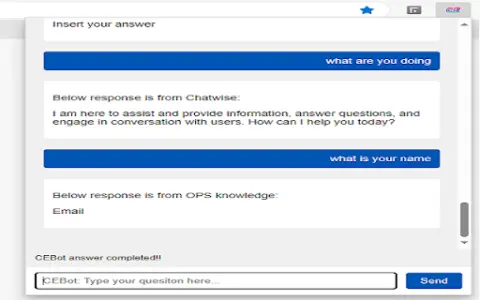
Qualcomm CE's question-answering system based on large language models.
Introduction
LLM based Q&A system for Qualcomm CE.
What is the Qualcomm CEBot AI Chrome extension/plug-in?
QCOM CEBot is a question-and-answer system based on large language models, specifically designed for Qualcomm CE devices. It can be used by clicking with the left mouse button or by pressing Ctrl+Shift+Z.
How to use the Qualcomm CEBot AI Chrome extension/plug-in?
Use CEBot by clicking with the left mouse button or pressing Ctrl+Shift+Z.
The core functions of the Qualcomm CEBot AI Chrome extension/plug-in
Question-answering system based on large language models
Related
OpenChit
An AI chat client with text, voice, and knowledge base capabilities.
Heyday
An AI-powered memory assistant that helps you recall forgotten information while you are browsing the web.
THEO: Your-Context-Powered AI
An AI assistant designed for startups, which provides structured business context for strategic AI applications.
Docsie 2.0
An AI-driven platform designed for creating and managing product documentation and knowledge bases.
Crane
An AI-driven personal knowledge base that provides daily summaries of the content one has read.
Dokkio Sidebar
The Dokkio Sidebar automatically identifies and organizes web pages, files, and messages, thereby creating a searchable knowledge base.