AI TOOL / #03007
Design My Room
Let AI-generated designs help you redesign your room in just a few seconds.
Introduction
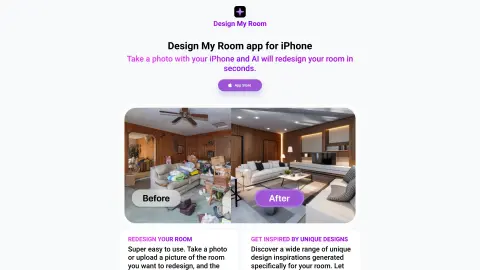
Redesign your room in seconds with AI-generated designs from a single photo.
What is “Design My Room”?
The “Design My Room” app allows you to completely redesign your room in just a few seconds, all by taking a single photo. Simply take a picture of your room, and the iPhone app will provide you with 5 different design options. It’s extremely easy to use: just take a photo or upload an image of the room you want to redesign, and the app will generate 5 unique design ideas. Discover a range of creative designs specifically tailored for your room – let this app inspire your home renovation project!
How to use Design My Room?
Use your iPhone to take photos of the room, or upload existing images. The app will generate five different design ideas for your room.
The core functions of Design My Room
Redesigned rooms powered by AI
For each photo, 5 different design options are generated.
Easy photo upload
Unique design inspiration
For each photo, 5 different design options are generated.
Easy photo upload
Unique design inspiration
Related
CasperPractice
An AI-powered preparation tool for the Casper exam, offering practice questions, simulated tests, and guidance—specifically designed for medical students.
LearnSmarter.ai
An artificial intelligence-driven learning platform designed to develop on its own and achieve its intended goals.
BookNote.AI
An AI assistant designed to quickly extract insights from books and facilitate discussions.
Otio
Otio is an AI platform that focuses on the collection, summarization of research materials, and the drafting of written content.
ChatMind – AI
AI-based mind mapping tools help organize various types of information into structured mind maps.
Summify: Summarize YouTube and Web Content
AI tools designed to generate instant summaries of articles, websites, and YouTube videos.